PopUp Architecture & Integrations
PopUp Mainframe is available with various options to suit your individual requirements. PopUp supports multiple architectural patterns and provides deep integration with other software to enable on-demand provisioning, CI/CD, data compliance. See below for more details.
How PopUp Works
The stand-alone PopUp Mainframe forms the foundation of our offering.
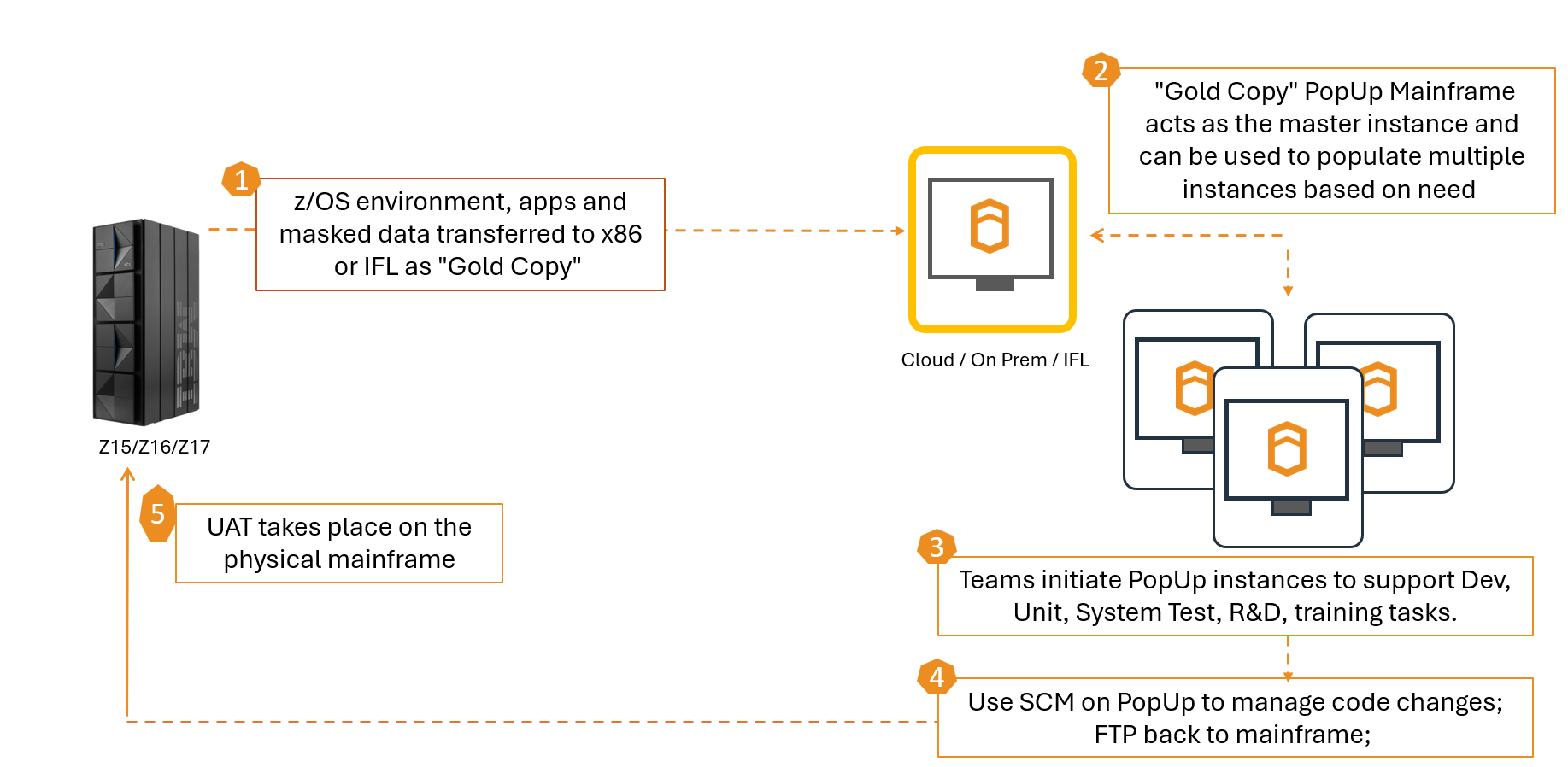
- Once the use cases have been identified, the required data and applications can be migrated from the physical mainframe to the PopUp, to build a "PopUp server gold copy". Data can be masked/sanitised in the prod zone. The PopUp server gold copy can run on Z or X hardware.
- Once an approved "gold copy" PopUp image is ready, it is easy to create working copies in any non-production environment.
- A working instance of the "PopUp server gold copy" can be stood up in the any non-prod environment, running on Z or X, and provides capacity to address the use case.
- Code changes can be managed using the existing SCM, or an alternative.
- Once the use case is complete, the code changes can be promoted via the preferred mechanism (e.g. automation or manual deploy) to the physical mainframe test environment.
PopUp Architecture
The below diagram shows the networking required for a standard PopUp Mainframe deployment.
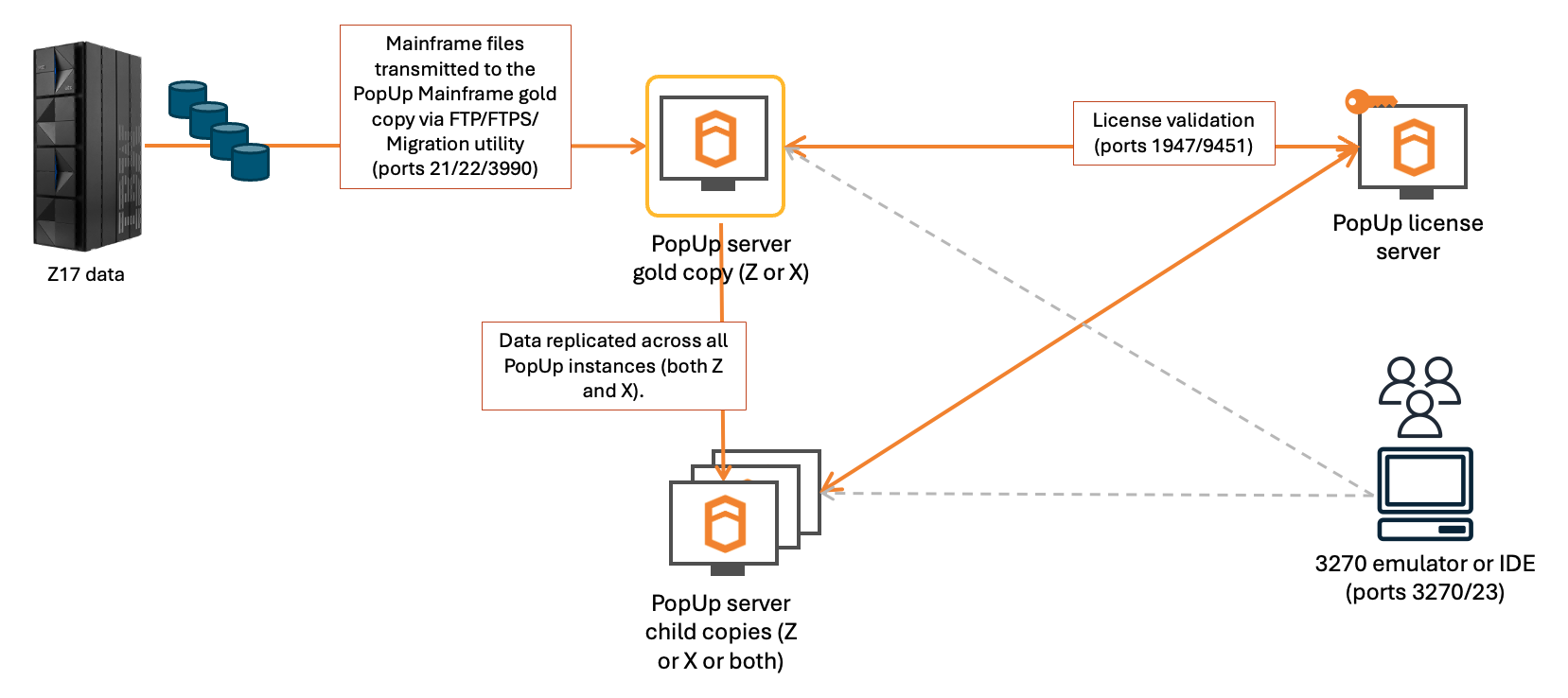
Note:
- PopUps can run on Z or X, and can be sent between the two using FastTrack.
- A connection to the PopUp license server is required from any running PopUp.
- To connect to the PopUp z/OS, a 3270 emulator or any z/OS-compatible IDE can be used.
For full details on network requirements, see System Requirements.
PopUp with FastTrack Option
Imagine being able to turn back time, and restore a previous version of your PopUp in seconds. FastTrack offers a guaranteed way to go back to the last working version of your PopUp environment, no matter how badly it's broken.
FastTrack is an optional extra which can be used with PopUp. It provides the ability to take snapshots on your entire z/OS system at any time, rollback to one of those snapshots or send a snapshot to a remote PopUp. For more details, see FastTrack.
See FastTrack in action below.
PopUp and Delphix integration
PopUp Mainframe integrates fully with Delphix Continuous Data (virtualization) and Delphix Continuous Compliance (masking).
Delphix Continuous Data provides virtualisation capabilities. Delphix Continuous Compliance provides masking and compliance capabilities for your mainframe data. PopUp can be used with either or both, depending on your requirements.
How PopUp & Delphix Works
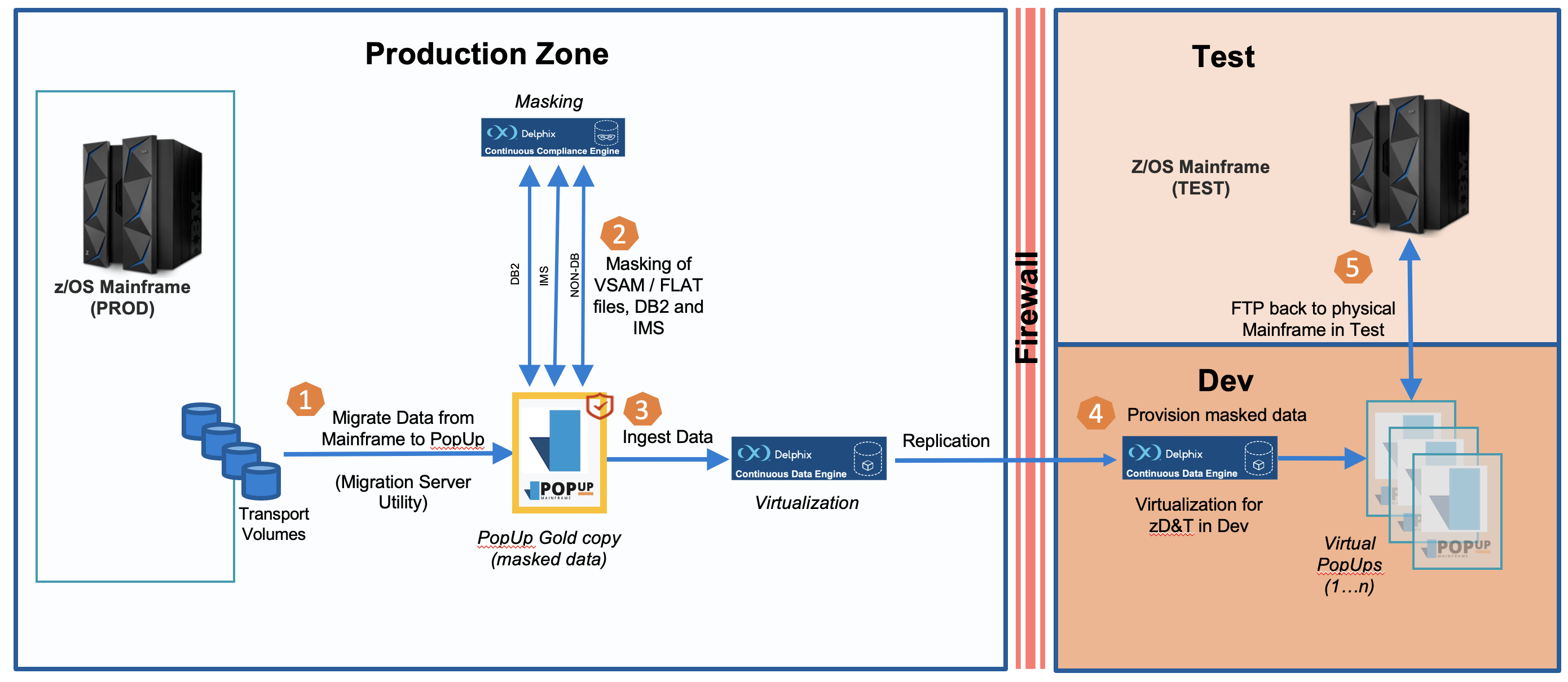
- Once the use cases have been identified, we support you to migrate the required data and applications from the physical mainframe to the PopUp in order to build a "gold copy PopUp". This gold copy would typically be sanitized and verified within a secure environment (e.g. prod zone) to prevent compliance breach before duplication to dev or test environments.
- Masking of sensitive data is automatically actioned by pre-defined, cross domain algorithms within the Delphix Continuous Compliance engine (masking).
- The secure, "gold copy PopUp" is ingested into the Delphix Continuous Data Engine (virtualization).
- A working instance of the "gold copy PopUp" is stood up in the dev environment and provides capacity to address the use case.
- Once the use case is complete, the code changes are promoted via the customer's preferred mechanism (e.g. automation or manual deploy) to the physical mainframe test environment.
For Delphix configuration details specific to PopUp Mainframe integration, click here: Delphix Configuration
Delphix Continuous Compliance (Data Masking)
One option for data compliance on the PopUp is using Delphix Continuous Compliance. Depending on the constraints of the operating environment, data can be masked on the physical mainframe (prior to the data migration process) or masked on the PopUp Mainframe (after the data migration process).
PopUp provides integration to Delphix Continuous Compliance which provides an efficient and seamless solution to mask any mainframe data types (including VSAM, variable-length files, Db2 and IMS).
For further information on masking data on the PopUp with Delphix, see this video.
PopUp and BMC integration
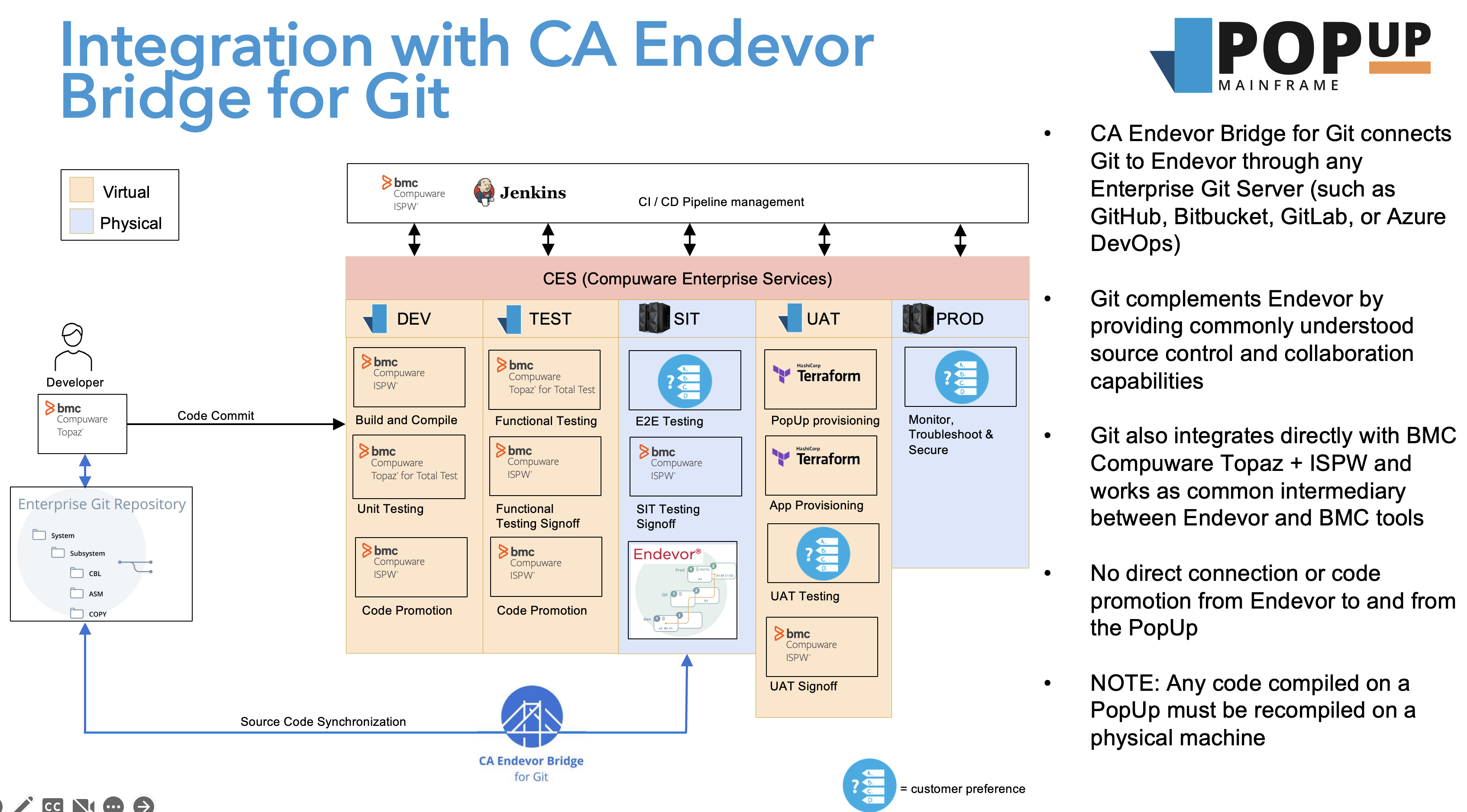
We provide the BMC AMI DevX software suite pre-installed and configured on the PopUp.
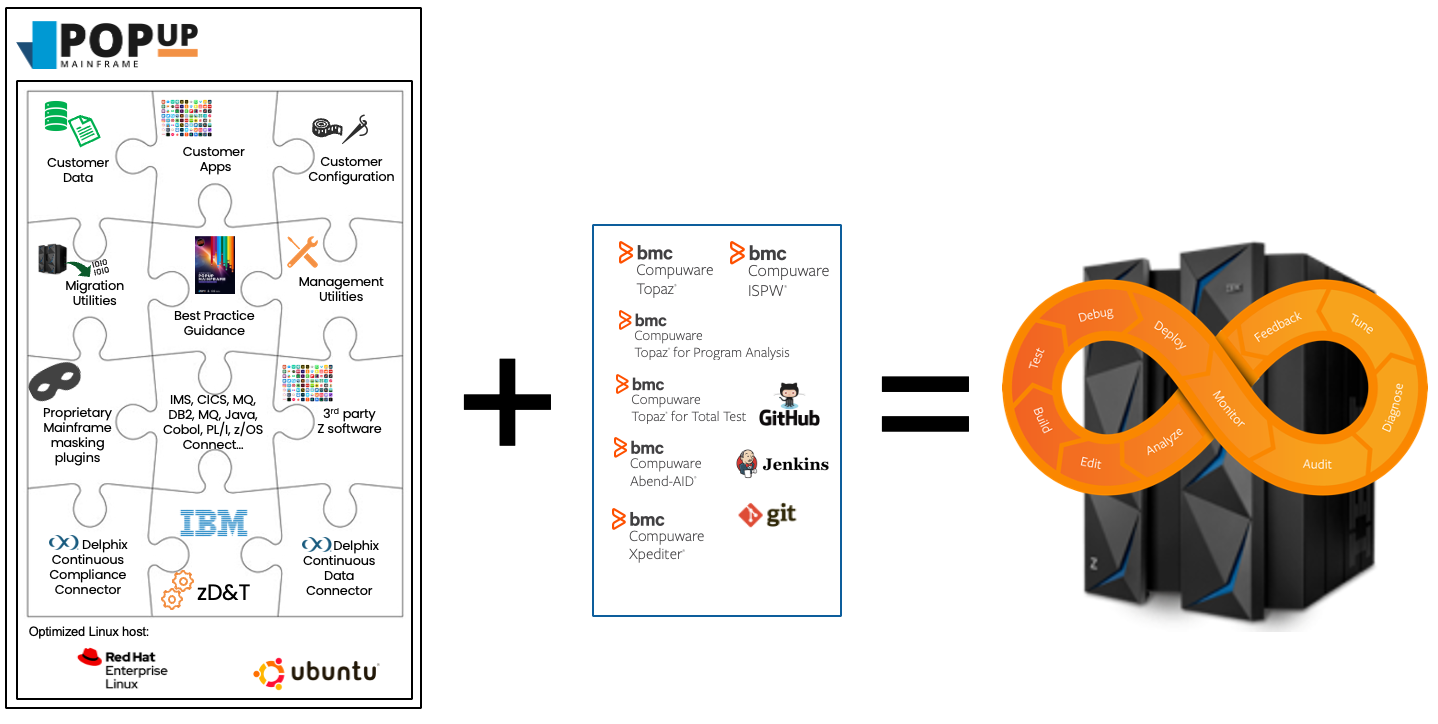
Here is a video demonstrating the power of using BMC's development and testing tools on PopUp Mainframe, orchestrated with a GitHub Actions pipeline:
This is an example of a common CI/CD pipleine scenario:
PopUp in the Cloud
From leading cloud marketplaces, you can launch your own PopUp Mainframe in minutes.
The PopUp virtual machine is pre‑built, configured, and performance‑tested to run optimally on modern cloud infrastructure. It delivers the high performance and reliability you expect from enterprise‑grade platforms.
PopUp is at the forefront of mainframe modernization. With offerings across Azure and AWS, PopUp enables on‑demand mainframe environments that accelerate projects and bring cutting‑edge practices to life.
Deploying PopUp Mainframe in the Cloud
Page last revised on: 2026-06-04