Automating z/OS with Ansible and Terraform
Automation is key to enabling scalable and repeatable processes that increase the efficiency of software teams. The core driver behind PopUp Mainframe is to help simplify every part of development and testing on Z systems, and one of the ways we do this is by providing tools to help you automate your processes.
Terraform and Ansible together provide comprehensive infrastructure lifecycle management: the ability to stand up and configure infrastructure, then tear it down when it's no longer required, in a fully automated way. They are industry-leading tools and used in many organisations to manage cloud and x86 infrastructure. Terraform and Ansible also support mainframe infrastructure - automated infrastructure and config management can be achieved with z/OS environments as well.
At PopUp Mainframe, we can support you to use both Terraform and Ansible with your z/OS environments (we use these tools in our own lab, too). Terraform provides infrastructure-as-code capabilities, including creating PopUp VMs, configuring them, applying network changes, and destroying them. Ansible's config-as-code capabilities enable you to deploy applications, configure systems, and automate a whole host of tasks. Both tools utilise version control so users can track changes over time and have confidence in what's being executed.
With z/OS you can use Terraform, Ansible, or both. Each one gives distinct benefits. We can help you get started with these tools by sharing pre-built scripts and config files. Find out more about each one below.
Ansible
Why Ansible for z/OS?
At the heart of PopUp's Z automation strategy is Red Hat Ansible, a widely adopted solution across the industry. Ansible supports z/OS through z-target modules and integrates seamlessly into hybrid infrastructure environments, making it an ideal choice for mainframe automation. Using the pre-installed Ansible and pre-built playbooks, PopUp Mainframe provides a straightforward way to implement automation practices in Z environments.
Using Ansible with PopUp reduces manual effort, promotes standardization, and codifies knowledge. By automating repeatable tasks, teams can dedicate more time to development, testing, training, and innovation, driving greater efficiency and productivity.
Pre-built playbooks are provided out-of-the-box with PopUp
The PopUp image includes Ansible and pre-built playbooks for common tasks. Once you have deployed your PopUp, the automation capabilities are ready to use. Check the Release Notes for Ansible version info.
These playbooks are designed to make z/OS development, testing, and operations more repeatable, scalable, and efficient, and are continously evolving to provide a wide range of automation capabilities. They currently cover:
- z/OS health checks, including system integrity validation, started tasks verification, APF and PARMLIB checks, and tool version consistency
- Configuration management, such as updating system identity, and setting environment variables
- User management, including creating and deleting RACF users
- System maintenance, such as clearing down the JES spool and managing licenses
- Alerting and monitoring, including DASD storage monitoring and threshold‑based notifications
- Software installation and provisioning, including PAX‑based installs and automated configuration
- And more, as the automation library continues to expand
See below for a deep dive video on the z/OS health check playbook.
Ansible Architecture on the PopUp
Ansible is installed on the PopUp image with playbooks available in /opt/shared . The playbooks can be run against the local PopUp (the same VM where Ansible is installed), or against a remote PopUp or z/OS system (an LPAR on your physical mainframe). One playbook can run against multiple targets simultaneously.
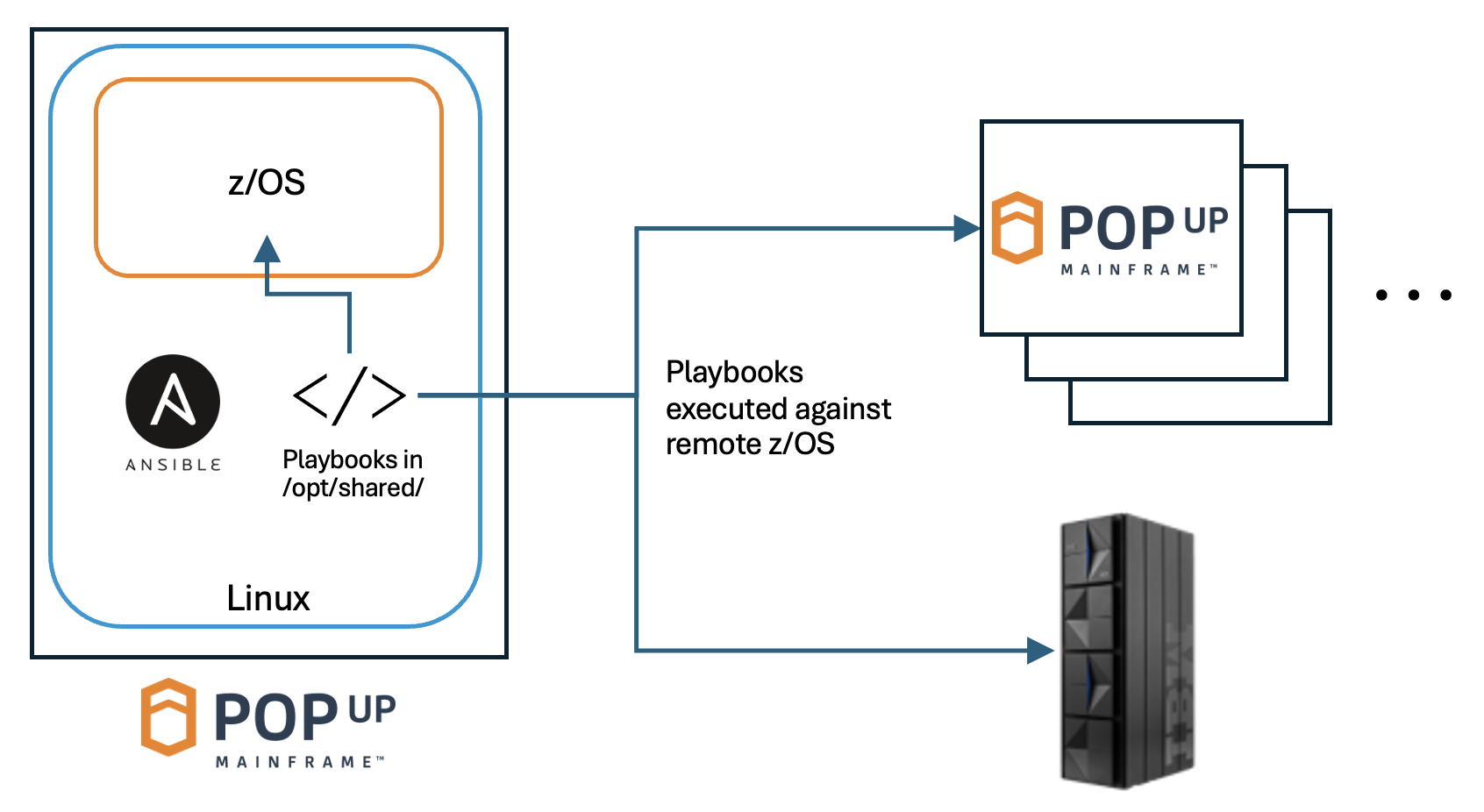
There are other architecture options. You may wish to:
- Use a secrets manager for passwords and keys, for example IBM Cloud Secrets Manager. The pre-built playbooks provide support for IBM Cloud Secrets Manager.
- Use a source code repository to store your playbook source, for example GitHub. The latest versions of all PopUp playbooks are also available in a GitHub repo. Contact the training or support team to get access.
- Manage your Ansible playbooks centrally, for example building a separate Ansible Control Node, or using Ansible Automation Platform. Both of the options are supported.
Getting started with Ansible automation
Running a playbook on z/OS is simple.
- Log into your PopUp Linux layer (as
ibmsys1) - Navigate to
/opt/shared/to find the playbooks - Look through the README in the playbook you are interested in to understand how it works and config required. You may find it easier to get familiar with the playbook and README by accessing it through the PopUp Mainframe toolbox GitHub repo. Contact us to get access.
- Edit the inventory file to point to your target environment (this can be the local PopUp, a remote PopUp, or a physical mainframe - or a combination of these). Edit config files as needed.
- Execute the playbook (sample commands provided in the README).
Best Practices for Ansible
To get the most out of the playbooks, we suggest:
- Go through the README in detail before executing a new playbook
- Implement a secrets management solution. This means the TSO passwords do not need to be stored in plain text in the inventory file. The playbooks support IBM Cloud Secrets Manager, and alternative secrets management systems can also be used.
- Playbooks can be run against multiple targets in 1 go - just list them in the inventory file. This is a great way to help reduce config drift by keeping your z/OS environments in sync.
Terraform
Why Terraform for z/OS?
Terraform is an industry leading infrastructure-as-code tool. It is used in organisations around the world to manage infrastructure, and helps you to track configuration using version control. The good news is that Terraform can be used with PopUp Mainframe too.
Using Terraform to manage your PopUp Mainframe infrastructure helps:
- codify infrastructure configuration to remove manual error
- reduce dependence on sysprogs
- provide the option of self-service to dev and test teams, to enable them to spin up a zOS environment as and when they need it
- deploy your Popups seamlessly across multiple plaforms, for example cloud and on-prem
- build full infrastructure lifecycle automation by integrating Terraform and Ansible into a pipeline
Getting started with Terraform automation
A PopUp Mainframe virtual machine instance, whether running in the cloud, on-prem or on Z hardware, can be treated just like any other VM and managed using Terraform. We can help you get started by sharing Terraform framework scripts, module definitions, and config. The implementation of Terraform for your set of VMs will depend on the underliying infrastructure - for example, Azure cloud, Proxmox, or VMWare.
Contact us to discuss further.
References and Further Reading
There is a wealth of information out there about Ansible and Terraform, and specifically using them with z/OS. These links may be useful:
- The PopUp Mainframe toolbox GitHub repo (Ansible playbooks), where you can find the latest playbooks.
- The IBM core z/OS modules available on Ansible Galaxy.
- Ansible documentation on connecting to z/OS USS
- Introduction to Terraform
- Terraform users guide
Page last revised on: 2026-06-24